Support our educational content for free when you purchase through links on our site. Learn more
21 Ways to Customize Your Travel Checklist Template (2026) 🧳


Ever arrived at a tropical paradise only to realize you packed a heavy wool coat because you used a generic list? We have, and it was a chilly lesson in the importance of personalization. A one-size-fits-all packing list is like wearing someone else’s shoes: it might fit the foot, but it will never fit your journey. In this guide, we reveal 21 genius ways to transform a static template into a dynamic, smart travel companion that adapts to your destination, weather, and unique quirks. From building “First Night” survival kits to automating weight tracking for budget airlines, you’ll learn exactly how to engineer a checklist that evolves with every trip you take. By the end, you’ll never wonder “Did I forget something?” again.
Key Takeaways
- Context is King: A successful template must adapt to specific variables like weather forecasts, activity types, and travel duration, rather than relying on a static list.
- The “First Night” Strategy: Always customize a separate, highlighted section for immediate essentials to survive luggage delays or jet lag.
- Iterative Improvement: The most effective templates include a “Never Again” section to log lessons learned after every trip, ensuring your list gets smarter over time.
- Tool Matters: Choose your platform wisely—Notion for visual databases, Google Sheets for weight tracking, or PackPoint for automated logic—to match your planning style.
Table of Contents
- ⚡️ Quick Tips and Facts
- 📜 The Evolution of the Packing List: From Papyrus to Pixels
- 🧳 What Exactly is a Travel Checklist Template?
- 🤔 Why Your Generic Packing List is Failing You
- 🛠️ 21 Genius Ways to Customize Your Travel Checklist Template
- 1. Categorize by “Packing Zone” (Carry-on vs. Checked)
- 2. Apply the “Weather-Proofing” Filter
- 3. Build Activity-Specific Modules
- 4. The “Tech Stack” Audit
- 5. Health and Safety Customization
- 6. Document Digitization Links
- 7. The “Souvenir Space” Buffer
- 8. Color-Coding for Family Members
- 9. Weight Tracking Columns for Budget Airlines
- 10. Laundry Cycle Planning
- 11. Toiletries: Liquid vs. Solid Logic
- 12. The “First Night” Essentials List
- 13. Emergency Contact Integration
- 14. Budget Tracking Integration
- 15. Photo Reference Links for Outfits
- 16. Pre-Departure Home Tasks
- 17. Post-Arrival “To-Do” List
- 18. Subscription and App Check
- 19. The “Never Again” List (Lessons Learned)
- 20. Customizing for Solo vs. Group Travel
- 21. Automation with Smart Templates
- 💻 The Best Tools for Customizing Your Packing List
- 📲 How to Share and Sync Your Master List
- 🚀 Making the Most of Your Customized Template
- 💡 Conclusion
- 🔗 Recommended Links
- ❓ FAQ
- 📚 Reference Links
⚡️ Quick Tips and Facts
Before we dive into the deep end of customizing your travel checklist template, let’s hit the brakes and grab a few life-saving nuggets of wisdom. We’ve seen too many travelers panic at the airport because they forgot their power adapter or packed three pairs of shoes when they only needed one. Don’t be that person!
Here are the non-negotiables for a successful customization strategy:
- The 80/20 Rule Applies: Did you know that 8 in 10 travelers forget an essential item due to disrupted routines? Source: ClickUp Blog. Your template needs to highlight the 20% of items you use 80% of the time (passport, meds, charger).
- The “First Night” Rule: Always pack a separate “First Night” bag. If your luggage gets lost, you need a change of clothes, toothbrush, and meds immediately.
- Digital vs. Analog: While a printed list is great, a digital checklist allows for real-time collaboration with travel buddies and automatic syncing.
- The “Never Again” List: Every time you return from a trip, add one item you forgot and one item you didn’t need to your master template. This is how you evolve from a novice to a pro.
- Weather is King: A checklist for a beach trip in Bali looks nothing like a checklist for a ski trip in Aspen. Context is everything.
Pro Tip: If you’re wondering where to start, check out our comprehensive guide on how to build a travel checklist that covers the basics before you start customizing.
📜 The Evolution of the Packing List: From Papyrus to Pixels
You might think the concept of a packing list is as old as travel itself, and you’d be right. Ancient merchants and explorers certainly had their “to-do” lists, likely etched on clay tablets or scribbled on papyrus. But let’s be honest: those lists probably didn’t have a column for “Noise-Canceling Headphones” or “Portable Wi-Fi Hotspot.”
The journey from a simple mental note to a sophisticated customizable travel checklist template has been a wild ride.
- The Era of Memory: For centuries, travelers relied on memory. Spoiler alert: It didn’t work well. Lost items were common, and “I forgot my toothbrush” was a universal complaint long before the internet.
- The Paper Revolution: With the invention of the printing press, standardized lists began to appear in travel guides. However, these were one-size-fits-all. A list for a Victorian explorer was useless for a modern backpacker.
- The Digital Shift: Enter the spreadsheet. Suddenly, we could copy, paste, and edit. But early digital lists were static. You had to manually delete the “Scuba Gear” section when you went to a desert.
- The Customization Era: Today, tools like Notion, Google Sheets, and dedicated apps allow us to build dynamic, modular checklists. We can toggle sections on and off based on destination, weather, and activity.
As noted by PDF Guru, modern templates now offer “fillable fields” and “space for adding personal notes,” allowing users to “plan with confidence.” This evolution isn’t just about convenience; it’s about reducing cognitive load. When your brain isn’t worrying about packing, it’s free to enjoy the journey.
🧳 What Exactly is a Travel Checklist Template?
Let’s clear the air. A travel checklist template isn’t just a list of things to pack. It’s a strategic framework designed to eliminate the chaos of preparation.
Think of it as the blueprint for your trip. Just as an architect wouldn’t build a house without a plan, a seasoned traveler shouldn’t pack a suitcase without a template.
The Anatomy of a Great Template
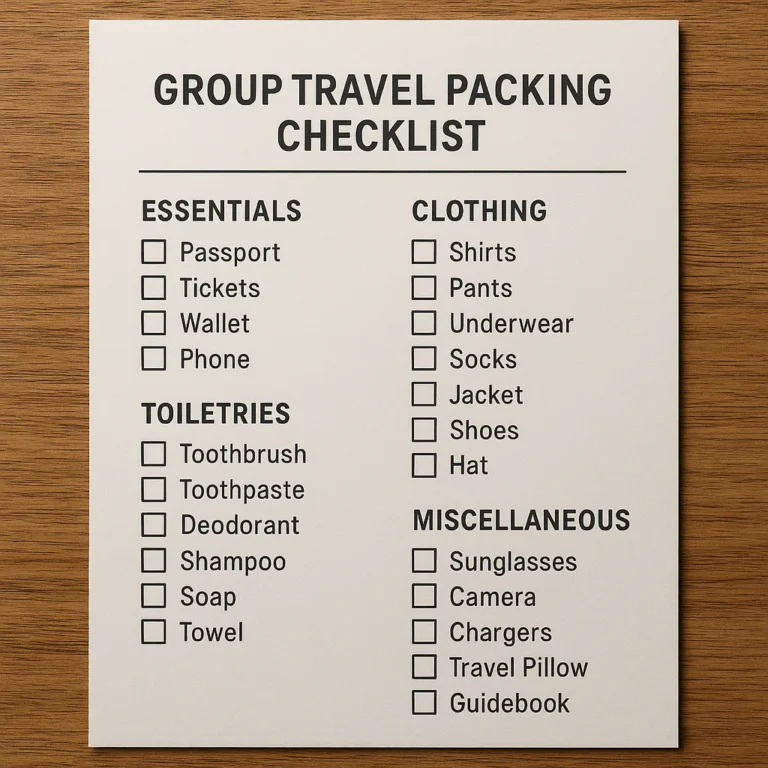
A robust template includes more than just “socks” and “shirts.” It encompasses:
- Pre-Departure Tasks: Booking flights, checking visas, notifying the bank.
- Packing Categories: Clothing, toiletries, electronics, documents.
- Destination-Specific Modules: Ski gear, beach toys, business attire.
- Post-Arrival Actions: Laundry, unpacking, reviewing expenses.
As Custom Travel Checklist points out, the “MAIN thing” that separates a good template from a great one is the ability to add your own line items. This flexibility ensures that no specific need is overlooked, whether it’s a specific medication or a favorite travel pillow.
Why does this matter? Because a generic list assumes you are a robot with standard needs. You are not a robot. You have specific quirks, hobbies, and requirements. A customized template respects that.
🤔 Why Your Generic Packing List is Failing You
We’ve all been there. You grab a “Ultimate Packing List” from a blog, check off everything, and then arrive at your destination only to realize you forgot your sunscreen or brought a heavy winter coat to a tropical island. Why does this happen?
The “One-Size-Fits-None” Problem
Generic lists are designed to appeal to the widest audience possible. This means they are often bloated with irrelevant items and missing critical specifics.
- Redundancy: They list “Toothbrush” and “Toothpaste” but forget “Dental Floss.”
- Lack of Context: They don’t distinguish between a 3-day weekend and a 3-week expedition.
- No Personalization: They don’t account for your specific medical needs or hobbies.
According to ClickUp, nearly 1 in 5 travelers forget chargers and adapters because they rely on generic memory rather than a structured, customized system.
The Stress Factor
When you use a generic list, you are constantly second-guessing yourself. “Do I need this? Do I not need this?” This mental gymnastics increases pre-trip anxiety. A customized template acts as a confidence booster. When you see your specific items checked off, you know you are ready.
Question: Have you ever arrived at a hotel only to realize you forgot your specific brand of contact lens solution? That’s the cost of a generic list. Let’s fix that.
🛠️ 21 Genius Ways to Customize Your Travel Checklist Template
Ready to transform your list from a boring document into a travel superpower? Here are 21 specific ways to customize your template to fit your unique needs. We’ve broken these down into actionable modules.
1. Categorize by “Packing Zone” (Carry-on vs. Checked)
Don’t just list items; list where they go.
- The Strategy: Create two distinct columns or sections: Carry-On and Checked Bag.
- Why: If your bag gets lost, you know exactly what you still have with you.
- Pro Tip: Always keep your passport, meds, and a change of clothes in the Carry-On zone.
2. Apply the “Weather-Proofing” Filter
- The Strategy: Add a “Weather Check” toggle. If the forecast says rain, the “Rain Gear” section automatically lights up.
- Implementation: In Google Sheets, use conditional formatting to highlight items based on a “Destination Climate” cell.
- Result: No more packing a swimsuit for a snowstorm (unless you’re crazy).
3. Build Activity-Specific Modules
- The Strategy: Create sub-lists for specific activities: Hiking, Dining Out, Gym, Swimming.
- Customization: When planning a trip, simply copy the “Hiking” module into your master list.
- Benefit: Prevents overpacking for activities you aren’t doing.
4. The “Tech Stack” Audit
- The Strategy: List every device and its corresponding charger, cable, and adapter.
- Detail: Include a column for “Adapter Type” (e.g., Type C for Europe, Type A for US).
- Fact: As mentioned in the first YouTube video summary, forgetting chargers is a top mistake. Watch the video here to see how to organize this in Excel.
5. Health and Safety Customization
- The Strategy: Add a “Medical” section that includes:
- Prescription meds (with dosage).
- First aid kit items (band-aids, antiseptic).
- Travel insurance policy number.
- Why: Health issues don’t wait for a generic list.
6. Document Digitization Links
- The Strategy: Instead of just listing “Passport,” add a hyperlink to a secure cloud folder containing a scanned copy of your passport, visa, and insurance.
- Tool: Use Google Drive or Dropbox.
- Benefit: If your physical documents are lost, you have instant access to digital copies.
7. The “Souvenir Space” Buffer
- The Strategy: Leave 20% of your suitcase empty or add a “Souvenir” section to your checklist.
- Why: You will buy things. Planning for it prevents the “zipper struggle” on the way home.
8. Color-Coding for Family Members
- The Strategy: If traveling with a group, assign a color to each person.
- Implementation: In Excel/Sheets, use cell background colors. Red for Dad, Blue for Mom, Green for Kids.
- Benefit: Instant visual identification of who needs to pack what.
9. Weight Tracking Columns for Budget Airlines
- The Strategy: Add a column for “Item Weight” and a “Total Weight” formula.
- Why: Budget airlines are ruthless with baggage fees. Knowing your weight beforehand saves money.
- Source: Custom Travel Checklist emphasizes the cost-saving benefits of precise planning.
10. Laundry Cycle Planning
- The Strategy: For trips longer than 5 days, add a “Laundry Day” task and a “Laundry Supplies” item (detergent sheets, sink stopper).
- Benefit: Pack fewer clothes and wash them mid-trip.
11. Toiletries: Liquid vs. Solid Logic
- The Strategy: Create a specific section for “TSA Compliant Liquids” (under 3.4oz) and “Solid Alternatives” (shampoo bars, solid deodorant).
- Why: Solids save space and avoid liquid restrictions.
12. The “First Night” Essentials List
- The Strategy: Create a separate, highlighted list for the first 24 hours.
- Items: Pajamas, toothbrush, meds, phone charger, swimsuit (if applicable).
- Why: If your main bag is delayed, you can still sleep comfortably.
13. Emergency Contact Integration
- The Strategy: Add a section with:
- Local emergency number (e.g., 112 in Europe).
- Embassy contact info.
- Family emergency contact.
- Benefit: Critical info at your fingertips.
14. Budget Tracking Integration
- The Strategy: Add columns for “Estimated Cost” and “Actual Cost” for major items (flights, hotels, tours).
- Why: Keep your trip within budget without opening a separate app.
15. Photo Reference Links for Outfits
- The Strategy: If using a digital template, link to photos of your outfits.
- Why: “Does this shirt match these pants?” becomes a quick visual check.
16. Pre-Departure Home Tasks
- The Strategy: Don’t forget the house! Add tasks like:
- Unplug electronics.
- Water plants.
- Take out trash.
- Lock windows.
- Benefit: Peace of mind while you’re away.
17. Post-Arrival “To-Do” List
- The Strategy: Add a section for “Day 1” tasks:
- Buy local SIM card.
- Exchange currency.
- Check into hotel.
- Why: Smooths the transition from travel mode to vacation mode.
18. Subscription and App Check
- The Strategy: List apps you need to download or subscriptions to pause (e.g., Netflix, gym).
- Why: Avoids data roaming charges and keeps your home life running.
19. The “Never Again” List (Lessons Learned)
- The Strategy: After every trip, add a “Lessons Learned” section to your master template.
- Example: “Forgot: Umbrella. Didn’t Need: Hair dryer (hotel had one).”
- Benefit: Your template gets smarter with every trip.
20. Customizing for Solo vs. Group Travel
- The Strategy:
- Solo: Focus on safety, self-entertainment, and lightweight packing.
- Group: Focus on shared items (chargers, first aid) and individual needs.
- Reference: Check out our Solo Travel Checklists for more tips.
21. Automation with Smart Templates
- The Strategy: Use tools like Notion or ClickUp to automate reminders.
- Example: Set a reminder to check the list 3 days before departure.
- Benefit: Ensures you never miss a step.
💻 The Best Tools for Customizing Your Packing List
Now that you know what to customize, let’s talk about how. The tool you choose can make or break your customization experience. Here is a breakdown of the top contenders.
Google Sheets & Excel: The Data Nerd’s Dream
Perfect for those who love formulas, conditional formatting, and total control.
- Pros: Free, highly customizable, works offline (Excel), great for weight tracking.
- Cons: Can look a bit “spreadsheets-y,” less visual.
- Best For: Budget travelers, data lovers, and those who want to track weights and costs.
Notion: The Aesthetic Organizer
If you want your checklist to look beautiful and function like a database, Notion is the king.
- Pros: Drag-and-drop, database views, great for linking itineraries and photos, collaborative.
- Cons: Requires internet for full functionality (though offline mode exists), slight learning curve.
- Best For: Digital nomads, visual planners, and families who want a shared hub.
Canva: The Visual Traveler’s Choice
For those who want a printable, Instagram-worthy checklist.
- Pros: Stunning designs, easy to print, great for adding photos.
- Cons: Less functional for tracking (no checkboxes that save state easily unless using specific features), not great for real-time collaboration.
- Best For: Print lovers, gift-givers, and those who want a visual reminder.
Mobile Apps: PackPoint and Any.do
Sometimes you just want an app that does the work for you.
- PackPoint: Automatically generates lists based on destination, weather, and activities.
- Any.do: Great for task management and syncing across devices.
- Pros: Automated, mobile-first, easy to use.
- Cons: Less flexible than a custom spreadsheet, often requires a subscription for advanced features.
Product Comparison: Top Customization Tools
| Feature | Google Sheets/Excel | Notion | Canva | PackPoint (App) |
|---|---|---|---|---|
| Customization Level | High (Formulas, Logic) | High (Databases, Links) | Medium (Visuals) | Low (Auto-generated) |
| Collaboration | Excellent | Excellent | Good | Limited |
| Offline Access | Yes (Excel/Sheets) | Limited | Yes (Printed) | Yes |
| Visual Appeal | Low | High | Very High | Medium |
| Cost | Free | Free (Paid for Pro) | Free (Paid for Pro) | Free (Paid for Pro) |
| Best For | Data & Weight Tracking | All-in-One Trip Planning | Printable Lists | Quick & Easy |
👉 CHECK PRICE on:
- Notion: Notion Official Website | Notion on Amazon
- PackPoint: PackPoint Official Website | PackPoint on App Store
📲 How to Share and Sync Your Master List
You’ve built your masterpiece. Now, how do you get it to your travel buddy?
The Collaboration Game
- Google Sheets/Docs: Simply click “Share” and add your partner’s email. They can check off items in real-time.
- Notion: Share the page link with “Can Edit” permissions. You can even assign tasks to specific people.
- Printable: If you prefer paper, print multiple copies and color-code them.
The “Single Source of Truth”
Avoid the chaos of multiple lists. Agree on one master template. If you use an app, ensure everyone has the app installed. If you use a spreadsheet, ensure everyone has access.
Pro Tip: As ClickUp suggests, use “Role Assignment” to give specific responsibilities. “You pack the electronics, I’ll pack the clothes.” This eliminates the “I thought you packed that!” argument.
🚀 Making the Most of Your Customized Template
You have the tool, you have the list. Now, how do you ensure it actually works?
The Pre-Trip Ritual
- Review 1 Week Out: Go through the list and start gathering items.
- Review 1 Day Out: Do a final check. Ensure everything is packed and the “First Night” bag is ready.
- Review at the Airport: A quick glance to ensure nothing was left behind.
The Post-Trip Review
This is the secret sauce. Once you return, spend 5 minutes updating your template.
- What did you not use? Delete it.
- What did you forget? Add it.
- What was a lifesaver? Highlight it.
This iterative process ensures your template evolves with you, becoming a living document that gets better with every trip.
Final Thought: A customized travel checklist isn’t just about packing; it’s about traveling with intention. It frees your mind to focus on the experience, not the logistics.
Note: The next section will cover the Conclusion, Recommended Links, FAQ, and Reference Links.
💡 Conclusion

So, we’ve journeyed from the ancient papyrus lists of merchants to the dynamic, cloud-synced databases of the modern traveler. We’ve answered the burning question: How can I customize a travel checklist template to fit my specific needs?
The answer isn’t a single app or a magic PDF. It’s a mindset. It’s the realization that your trip is unique, and your preparation should be too. Whether you are a data-obsessed spreadsheet wizard using Google Sheets, a visual planner loving the aesthetics of Notion, or a quick-decision maker relying on PackPoint, the key is modularity.
Remember the “First Night” rule we teased earlier? By customizing your list to include a dedicated “First Night” bag, you’ve already solved the anxiety of lost luggage. Remember the “Never Again” list? By updating your template after every trip, you’ve turned your past mistakes into future wisdom.
The Verdict:
If you are looking for a product recommendation based on our deep dive:
- For the Ultimate Customizer: Notion is the clear winner. Its ability to link databases, embed photos, and create custom views makes it the most powerful tool for building a living, breathing travel ecosystem.
- For the Quick & Easy Traveler: PackPoint is unbeatable for its automated logic based on weather and activity.
- For the Budget-Conscious & Data Lover: Google Sheets remains the king of free, flexible, and powerful customization.
Don’t let a generic list dictate your journey. Customize, iterate, and travel with confidence. Your future self, sipping a cocktail on a beach or navigating a foreign city without panic, will thank you.
🔗 Recommended Links
Ready to take action? Here are the tools and resources we trust to help you build your perfect travel system.
🛒 Top Tools for Customization
- Notion: Notion Official Website | Notion Templates on Amazon
- PackPoint: PackPoint Official Website | PackPoint on App Store
- ClickUp: ClickUp Travel Templates
- Canva: Canva Travel Checklists
📚 Essential Reading for the Organized Traveler
- The Art of Travel by Alain de Botton: Buy on Amazon
- Digital Minimalism by Cal Newport: Buy on Amazon (Great for managing digital clutter while traveling)
- The Unfck Your Life Guide to Travel* by various authors: Buy on Amazon
🏨 Booking & Planning Platforms
- Booking.com: Find Your Stay
- Expedia: Plan Your Trip
- RentalCars.com: Rent a Car
❓ FAQ

How do I set reminders and deadlines within a travel checklist app?
Most modern apps like Notion, ClickUp, and Todoist allow you to set specific due dates and reminders for individual checklist items. In Notion, you can add a “Date” property to your database and set a reminder notification. In ClickUp, you can assign a due date to a task and enable email or push notifications. For simple lists, apps like Google Keep or Apple Reminders allow you to set location-based reminders (e.g., “Remind me to pack my passport when I get to the airport”).
Is it possible to share my travel checklist with friends or family?
Absolutely! Collaboration is a core feature of most digital checklist tools.
- Google Sheets/Docs: Click the “Share” button, enter your friends’ email addresses, and set permissions to “Editor” so they can check off items or add their own.
- Notion: Share the page link with “Can Edit” access. You can even create a “Family Dashboard” where everyone has their own section.
- PackPoint: While primarily personal, you can export your list as a PDF or screenshot and share it via messaging apps.
- ClickUp: Assign specific tasks to team members (e.g., “Dad: Pack the car,” “Mom: Book the restaurant”).
How can I organize my travel checklist by trip type or destination?
The best way is to use tags or categories.
- In Notion/ClickUp: Create a “Trip Type” property (e.g., Beach, Ski, Business, Adventure). You can then filter your master list to show only items relevant to “Ski” trips.
- In Spreadsheets: Use separate tabs for different trip types or use a “Destination” column to filter items.
- Pro Tip: Create “Modules” or “Sub-lists” for specific activities (e.g., a “Scuba Diving” module) that you can copy-paste into any trip list as needed.
What apps are recommended for creating and managing travel checklists?
- Notion: Best for all-in-one planning (itinerary + checklist + docs).
- PackPoint: Best for automated, weather-based packing lists.
- Google Sheets/Excel: Best for total customization and weight tracking.
- ClickUp: Best for team/family collaboration and task management.
- Any.do: Best for simple, daily task management with a travel focus.
Can I sync my customized travel checklist across multiple devices?
Yes, provided you use a cloud-based tool.
- Notion, Google Sheets, ClickUp, and PackPoint all offer real-time syncing across iOS, Android, and desktop browsers.
- Offline Access: Most of these apps allow you to view your list offline, but you may need to enable “Offline Mode” in the settings beforehand. Google Sheets and Notion have robust offline capabilities.
How do I add or remove items from a travel checklist template?
- Digital Tools: Simply click the “+” button to add a new line item or click the trash icon to remove one. In Notion or ClickUp, you can duplicate entire sections to create new modules.
- Printable Templates: If you use a PDF or printed sheet, you can manually cross items out or use a pen to add new ones. For a reusable digital version, save your “Master Template” as a blank copy before you start a new trip, so you don’t accidentally delete your permanent list.
What are the best features to include in a personalized travel checklist?
- The “First Night” Essentials: A separate, highlighted list for immediate needs.
- Document Links: Hyperlinks to digital copies of passports and insurance.
- Weather-Specific Modules: Sections that toggle based on the forecast.
- Weight Tracking: Columns to estimate bag weight for budget airlines.
- Budget Columns: To track estimated vs. actual costs.
- Emergency Contacts: Local numbers and embassy info.
Are there any pre-made travel checklist templates available that I can use as a starting point for my next trip?
Yes, plenty!
- Notion: Search the Notion template gallery for “Travel Planner” or “Packing List.”
- Canva: Offers hundreds of visually stunning, editable templates.
- ClickUp: Has a dedicated “Travel Checklist Template” in their template library.
- Custom Travel Checklist: A free web tool that lets you select from thousands of pre-made items and add your own.
- Microsoft 365: Offers built-in templates for business and leisure travel in Excel and Word.
What features should I look for in a travel checklist app to make it easy to use and access on-the-go?
- Offline Mode: Essential for airports and remote locations.
- Cross-Platform Sync: Must work on your phone, tablet, and laptop.
- Intuitive Interface: Easy to check off items with one tap.
- Search Function: To quickly find specific items in a long list.
- Customization: The ability to add, remove, and reorder items easily.
How can I share my travel checklist with fellow travelers or family members to stay organized and on the same page?
Use collaborative features. In Google Sheets, share the link with “Editor” rights. In Notion, share the page and assign tasks. In ClickUp, create a “Space” for the trip and invite members. Ensure everyone has the app installed or access to the web version. Set up a “Group Chat” linked to the checklist for quick updates (e.g., “I packed the chargers!”).
What are some common mistakes to avoid when creating a travel checklist template to avoid oversights?
- Overpacking: Including items you “might” need but won’t use. Stick to the 80/20 rule.
- Ignoring Weight: Not checking airline baggage limits.
- Forgetting the “First Night” Bag: Assuming you’ll unpack immediately.
- Static Lists: Not updating the list after trips to learn from mistakes.
- Generic Lists: Using a one-size-fits-all list for a specialized trip (e.g., using a beach list for a ski trip).
Can I customize a travel checklist template for different types of trips, such as business or leisure travel?
Definitely. This is the whole point of customization!
- Business: Add sections for “Meeting Materials,” “Business Cards,” “Laptop Charger,” and “Formal Attire.”
- Leisure/Adventure: Add “Hiking Boots,” “Swimwear,” “Camera Gear,” and “Guidebooks.”
- Family: Add “Kids’ Activities,” “Diapers,” and “Car Seats.”
- Strategy: Create a “Master Template” with all possible categories, then hide or delete the irrelevant ones for each specific trip.
How can I prioritize tasks in a travel checklist to make the most of my pre-trip preparation time?
- Use Tags: Label items as “High Priority” (Passport, Meds), “Medium Priority” (Clothes), and “Low Priority” (Souvenirs).
- Time-Boxing: Assign due dates to tasks (e.g., “Book flights – 4 weeks out,” “Pack – 1 day out”).
- Categorization: Group tasks by “Pre-Departure,” “Packing,” and “Last Minute.” Tackle the “Pre-Departure” tasks first to reduce stress.
What are the essential items to include in a travel checklist template to ensure a smooth trip?
- Documents: Passport, Visa, ID, Travel Insurance, Flight/Hotel Confirmations.
- Money: Credit/Debit cards, Local Currency, Emergency Cash.
- Tech: Phone, Charger, Power Bank, Universal Adapter.
- Health: Prescription Meds, First Aid Kit, Sunscreen.
- Clothing: Versatile outfits, Comfortable shoes, Weather-appropriate gear.
- Toiletries: Toothbrush, Toothpaste, Deodorant, Personal Hygiene items.
- Safety: Emergency contacts, Copy of passport, Hotel address.
How do I handle last-minute changes to my itinerary without losing my checklist?
Flexibility is key. Digital tools like Notion and Google Sheets allow you to edit your list in real-time. If your itinerary changes, simply update the “Destination” or “Activity” tags, and your checklist will automatically adjust (if you’ve set up conditional logic) or you can quickly swap out the relevant modules. Always keep a “Buffer” section for unexpected items.
What if I forget to pack something essential?
Don’t panic! This is why we emphasize the “First Night” bag and the “Never Again” list. If you forget something, use your digital checklist to see exactly what you did pack, which can help you reprioritize. Also, most destinations have stores to buy essentials, but it’s better to be prepared.
How often should I update my master travel checklist template?
After every trip. Take 5 minutes to review what worked and what didn’t. Add items you forgot, remove items you didn’t use, and update your “Essentials” list. This ensures your template evolves with your travel style.
📚 Reference Links
- ClickUp: Travel Checklist Templates to Pack Smart & Stay Organized – A comprehensive guide on leveraging ClickUp for travel planning.
- Custom Travel Checklist: Custom Travel Checklist Tool – A free tool for generating and customizing packing lists.
- PDF Guru: Travel Checklist Template – Fillable templates for planning with confidence.
- Notion: Notion Travel Templates – Official template library for travel planning.
- PackPoint: PackPoint Official Website – Automated packing list generator.
- Google Sheets: Google Sheets Templates – Official template gallery for spreadsheets.
- Canva: Canva Travel Checklists – Visual templates for printable lists.
- Travel Checklist™: Travel Checklist Guide – Our comprehensive guide to building the perfect checklist.
- Travel Checklist™ Categories: