Support our educational content for free when you purchase through links on our site. Learn more
How a Travel Checklist App Helps Families Travel 🧳


A travel checklist app simplifies planning for families with children by gathering packing lists, trip tasks, and caregiver responsibilities in one shared place. Start with a checklist tailored to your destination and kids’ needs, then assign tasks so fewer essentials—and fewer people’s patience—get left behind.
We once watched a family reach the hotel only to discover that everyone had packed a charger, but nobody had packed the child’s beloved bedtime toy. A shared, child-specific checklist won’t prevent every travel surprise, but it can make the easy-to-forget essentials easier to remember.
Key Takeaways
- Create one shared trip checklist for packing, documents, health supplies, travel-day bags, and before-you-leave tasks.
- Customize lists by child, age, destination, and bag. Templates are helpful prompts, not instructions to pack the whole house.
- Assign tasks to caregivers and give older kids simple packing jobs to make responsibilities clear.
- Check offline access, privacy, and sharing features before relying on a travel checklist app on the road.
- Use official sources for travel-document, airport-security, and car-seat guidance; an app organizes tasks but can’t verify requirements or safety.
Table of Contents
- ⚡️ Quick Tips and Facts
- 🧭 How a Family Travel Checklist App Simplifies Planning
- From scattered notes to one shared family travel plan
- What to add to a family trip checklist
- 📱 How Travel Checklist Apps Work
- Common features: shared lists, reminders, templates, and syncing
- Travel checklist apps versus notes apps and spreadsheets
- 🕰️ The Rise of Digital Family Travel Planning
- ✅ 15 Ways a Checklist App Helps Families Traveling With Children
- 1. Build reusable packing lists for every child
- 2. Organize baby, toddler, and big-kid essentials
- 3. Track documents, tickets, and reservations
- 4. Plan medications and health supplies
- 5. Prepare carry-on bags and in-flight activities
- 6. Divide tasks between caregivers
- 7. Give children age-appropriate packing jobs
- 8. Remember comfort items and sleep routines
- 9. Plan meals, snacks, and allergy needs
- 10. Prepare for weather and changing conditions
- 11. Keep airport, road-trip, and transit tasks straight
- 12. Track safety tasks and emergency contacts
- 13. Stay organized offline and on the move
- 14. Manage the return trip and laundry
- 15. Reduce last-minute stress and forgotten-item panic
- 🧳 Build a Complete Family Vacation Checklist
- Packing list for babies and toddlers
- Packing list for school-age children and teens
- Family travel documents and booking details
- Road-trip checklist and car-seat essentials
- Air travel checklist for kids
- Beach, camping, and international trip add-ons
- 🛠️ Set Up Your App Before the Trip
- Choose a family travel checklist app that fits your needs
- Create lists by child, bag, destination, and travel day
- Set reminders, due dates, and task owners
- Share lists with co-parents, relatives, or caregivers
- Use templates without packing the entire house
- 👨 👩 👧 👦 Family-Friendly Planning by Age and Travel Style
- Traveling with a baby
- Traveling with toddlers and preschoolers
- Traveling with school-age kids and teens
- Planning for solo parents and multigenerational trips
- 🔒 Privacy, Security, Offline Access, and Accessibility
- Protect children’s personal and travel information
- Check app permissions and data-sharing policies
- Offline access, syncing, and battery considerations
- Accessibility features for different family needs
- ⚖️ Benefits, Limitations, and Common Family Frustrations
- What a checklist app can—and cannot—do
- Avoiding duplicate tasks, notification overload, and outdated lists
- When a paper backup still makes sense
- 💡 Quick Tips for Stress-Free Family Trip Planning
- Conclusion
- Recommended Links
- FAQ
- How does a travel checklist app help families with children?
- What should be on a family travel checklist?
- Can multiple caregivers share and update a travel checklist?
- Are travel checklist apps useful for packing with toddlers?
- Can a travel checklist app work without internet access?
- How can families keep children’s information private in a travel app?
- Is a travel checklist app better than a notes app or spreadsheet?
- Reference Links
⚡️ Quick Tips and Facts
The most useful family travel checklist is the one everyone can access, understand, and actually use. An app can bring packing, pre-trip tasks, and shared responsibilities together, but it won’t decide whether your toddler needs three stuffed animals. (We’ve met the toddler. The answer is yes.)
For a companion guide to what belongs on the list, see our article on specific travel checklist items for families with children.
| Quick fact | Why it matters for families |
|---|---|
| Shared lists can reduce repeated “Who packed the wipes?” conversations. | Assign items to caregivers or children and check them off as they’re packed. |
| Templates are a starting point, not a packing commandment. | Customize for your child’s age, destination, trip length, weather, and activities. |
| Keep travel documents and essential medications easy to locate. | A packing app organizes tasks; it doesn’t replace official travel or medical guidance. |
| Offline access can help on the move. | Confirm how the app handles offline lists before relying on it; PackMyTrip says its lists work offline. |
| Privacy deserves a quick check. | Review app permissions and privacy disclosures before adding sensitive family information. |
Our quick-start method: Make one trip list, split it into packing, documents, health, and before-you-leave tasks, then share it with the adults who are actually helping.
A travel checklist app simplifies logistics, but how does it help when there are three people packing three different bags and one child insists that a toy dinosaur is “essential equipment”? Let’s start with the central idea.
🧭 How a Family Travel Checklist App Simplifies Planning
A family trip has two parallel itineraries: the one showing flights, hotels, and activities, and the one showing who is packing the snacks, finding the passports, and remembering the bedtime comfort toy. A checklist app gives the second itinerary a home.
Instead of keeping packing notes in a text thread, school reminders in a calendar, and “buy sunscreen” on a scrap of paper, you can put practical trip tasks in shared lists. Some family organizer apps, such as Cozi Family Organizer, use shared lists and calendars for everyday coordination. A dedicated travel checklist app such as PackMyTrip focuses more directly on trip packing and preparation.
From scattered notes to one shared family travel plan
The app is most helpful when it becomes your single working checklist rather than another place to duplicate information. Add the task once, assign it, and let the relevant person mark it complete.
For example:
- Caregiver 1: passports, booking confirmations, and prescribed medication.
- Caregiver 2: clothes, chargers, and travel-day snacks.
- Older child: books, headphones, and their own day bag.
- Everyone: check their personal bag before leaving.
Cozi’s own vacation packing checklist guidance recommends creating a shared vacation list, customizing it for the trip, and using the calendar for related tasks such as laundry and pet care. Its practical strength is family-wide coordination; its lists are not exclusively designed for travel.
What to add to a family trip checklist
Start with categories that match the way your family travels:
- Travel documents: passports or IDs, tickets, reservation details, and required consent documents.
- Packing: clothing, toiletries, child-specific supplies, and comfort items.
- Health and safety: regular medication, first-aid basics, emergency contacts, and any necessary equipment.
- Travel-day plan: snacks, entertainment, chargers, and what goes in each carry-on or car bag.
- Before departure: laundry, home preparation, transport arrangements, and a final bag check.
- Return-home tasks: laundry, unpacking, and replenishing items you want ready for next time.
For a more specialized trip, build on relevant lists for beach vacations, adventure travel, backpacking, or budget travel. The best family list is not the longest one. It’s the one tailored to your actual plans.
📱 How Travel Checklist Apps Work
Most travel checklist apps turn a trip into a set of categories and tasks. Depending on the app, you may be able to create a list from a template, customize suggested items, assign tasks, set reminders, or share the trip with other travelers.
Features vary, so verify them in the app listing and its privacy information before putting family plans or personal details inside.
Common features: shared lists, reminders, templates, and syncing
| Feature | How it helps on a family trip | What to check |
|---|---|---|
| Templates | Gives you a starting list for a trip type, duration, or activity. | Can you edit, remove, or add items easily? |
| Shared lists | Lets caregivers coordinate packing and preparation. | Does sharing require an account, invite, or code? |
| Task ownership | Makes it clearer who is handling a task. | Can you assign tasks, or only share the list? |
| Reminders | Helps surface tasks before departure. | Are reminders available in the free plan? |
| Offline access | Keeps lists available without a reliable connection. | Does offline access include edits, or just viewing? |
| Saved items | Makes repeat trips faster to set up. | Are favorite-item limits tied to the plan? |
PackMyTrip’s App Store description says it offers trip templates for 15+ trip types, lets users share a trip using a code, and supports offline access to lists. The listing also describes free and paid plan limits, so check the current PackMyTrip listing for up-to-date details. Those features may suit families who want trip-specific suggestions, but they don’t replace your own judgment about what a particular child needs.
Travel checklist apps versus notes apps and spreadsheets
| Option | Best for | Possible drawback |
|---|---|---|
| Travel checklist app | Trip templates, packing categories, and reusable travel lists. | Features, sharing, and offline behavior depend on the app. |
| Family organizer app | Combining household calendars, shopping, and shared to-dos. | Travel-specific packing features may be limited. |
| Notes app | A quick, flexible list for one trip. | Tasks can be harder to assign, reuse, or sort. |
| Spreadsheet | Detailed plans with custom columns and information. | Less convenient for quick check-offs on the go. |
| Paper checklist | A simple backup or a child-friendly packing activity. | Changes and shared updates take more effort. |
There is no universal winner. Cozi’s shared lists may make sense if your family already uses its calendar and to-do features. A dedicated travel app may be a better fit if templates, trip-specific packing suggestions, and offline access are your priorities. A notes app may be enough for a short weekend away.
🕰️ The Rise of Digital Family Travel Planning
Family travel planning has always involved lists. The difference is that a digital checklist can be edited, reused, and shared from a phone rather than rewritten every time someone says, “We’re going away next week, right?”
Apps also make it easier to divide trip preparation into separate jobs. You can keep the packing list distinct from the calendar, grocery run, and “please remember to water the plants” reminder. Cozi’s vacation checklist illustrates one approach: use the family organizer’s lists for packing and its calendar for pre-trip scheduling.
But digital convenience comes with trade-offs. Interface changes can frustrate users, sharing can be more complicated than expected, and privacy settings deserve attention. In reviews summarized on the Cozi App Store page, feedback includes both positive comments about shared family organization and criticism of parts of the calendar experience. That contrast is useful: an app can work well for a family’s lists while still disappointing someone who relies on another feature.
✅ 15 Ways a Checklist App Helps Families Traveling With Children
1. Build reusable packing lists for every child
Create a separate section for each child, organize the list by bag. Save recurring basics such as pajamas, toothbrushes, and a favorite bedtime item, then adjust the list for the next trip.
Why it helps: “Packed” becomes specific. You can see whether each child’s swimwear is in a bag rather than assuming somebody else handled it.
2. Organize baby, toddler, and big-kid essentials
A baby’s list might include feeding supplies and spare outfits; a toddler’s might focus on snacks, changes of clothes, and familiar comfort items. A school-age child may be able to pack books, headphones, or activity supplies independently.
PackMyTrip says its family and baby templates provide child-oriented suggestions. Treat those prompts as a starting point, then check them against your own routines and the guidance of your child’s clinician where relevant.
3. Track documents, tickets, and reservations
Add a reminder to verify travel documents and make sure every caregiver knows where essential confirmations are stored. Keep sensitive information in a secure place rather than copying it into an ordinary packing-list field.
Official requirements vary by destination and traveler. Check the U.S. Department of State’s travel guidance for international trips, and confirm requirements with the relevant authorities for your family’s nationality and itinerary.
4. Plan medications and health supplies
Put routine medication, any necessary medical equipment, and a small health kit on a dedicated checklist. If a child has a medical condition or specific medication instructions, follow professional advice and plan how supplies will be carried and stored.
For air travel, the Transportation Security Administration’s medication guidance can help you understand screening considerations. Rules can depend on the item and circumstances, so check current official guidance before traveling.
5. Prepare carry-on bags and in-flight activities
Use a separate travel-day checklist for items you may need before reaching your destination:
- Snacks and a refillable water bottle, subject to current security rules.
- A change of clothes for a child, and a spare top for an adult if useful.
- Wipes, tissues, and disposal bags.
- Headphones, books, small activities, and device chargers.
- Comfort items and essentials your child may need during the journey.
For airport security and traveling with children, check the TSA’s official travel guidance. For road trips, make a separate list for the car rather than packing every travel-day item into a suitcase.
6. Divide tasks between caregivers
Assign tasks to the person responsible, not merely the person most likely to notice them. One adult can handle reservations and document checks; another can organize clothing, food, or home preparation.
A shared list also helps when grandparents, another parent, or a caregiver is involved. Before sharing, decide what they need to see and avoid including sensitive personal details unless the app is suitable for storing them.
7. Give children age-appropriate packing jobs
Older kids can choose a limited number of books or activities, pack their own headphones, and check their list with an adult. Younger children can help select a comfort item or place approved items in their bag.
Keep responsibility age-appropriate: a child can check off their swimsuit, but an adult should verify documents, medication, and other essentials.
8. Remember comfort items and sleep routines
A familiar toy, sleepwear, nightlight, or other routine item can make an unfamiliar room feel less unfamiliar. Add the item to both the packing list and a last-to-pack, first-to-find reminder if it will be needed right up to departure.
Cozi’s sample vacation checklist includes items such as a white-noise machine, nightlight, and favorite plushie. Use these as prompts, not as a suggestion that every family needs to bring a portable bedroom.
9. Plan meals, snacks, and allergy needs
Use the checklist to record snacks, feeding supplies, and any food-related needs that matter for your trip. For allergies or medical dietary requirements, follow your healthcare professional’s advice and communicate with relevant transport providers or accommodation hosts where needed.
Cozi’s family organizer can also connect meal planning with shopping lists, according to its app description. That can be useful before departure, even though it is not a dedicated travel meal planner.
10. Prepare for weather and changing conditions
Build a list around the forecast and the activities, not a generic “one jacket per child” rule. A beach trip, a mountain walk, and a city break call for different shoes and layers. Check the forecast close to departure and update the list.
For beach planning, try our Beach Vacation Checklists. For active itineraries, see Adventure Travel Checklists.
11. Keep airport, road-trip, and transit tasks straight
Separate transport-specific tasks so a family can see what is relevant at a glance.
- Flying: check-in, baggage plan, travel documents, carry-on essentials, and airport transfer.
- Driving: vehicle readiness, car seats, route plan, snacks, stops, and roadside supplies.
- Train or bus: tickets, boarding details, seat arrangements, and a compact activity bag.
For car-seat selection and installation, use authoritative safety information such as the National Highway Traffic Safety Administration’s car seat guidance. Don’t rely on a checklist alone for installation or fit.
12. Track safety tasks and emergency contacts
Add a reminder to share essential contact details with relevant caregivers and confirm how your family will reconnect if separated. Keep any child identification or emergency plan consistent with your family’s circumstances and local advice.
For international travel, review official destination information through the U.S. Department of State or the appropriate authority for your country. Avoid putting highly sensitive information in a checklist that is broadly shared.
13. Stay organized offline and on the move
Check whether your chosen app can display lists without a connection, and whether you can still make changes offline. PackMyTrip states that its lists are available offline; consult its current App Store information for details and platform requirements.
For extra resilience, keep critical travel details in a secure, accessible backup. A screenshot or printed confirmation may help in some situations, but protect private data and follow the relevant provider’s recommendations.
14. Manage the return trip and laundry
Add a short return checklist: separate dirty clothes, check drawers and charging outlets, repack daily essentials, and confirm the route home. A list that covers only departure has a habit of leaving one charger behind in a hotel room.
15. Reduce last-minute stress and forgotten-item panic
Move tasks out of your head and give them a date or an owner. Do laundry earlier, check documents before departure day, and reserve the final review for items that really must be packed at the last minute.
That doesn’t guarantee a perfectly serene departure. It does make it easier to identify what is left and who can handle it—an appreciable improvement when the taxi is already outside.
🧳 Build a Complete Family Vacation Checklist
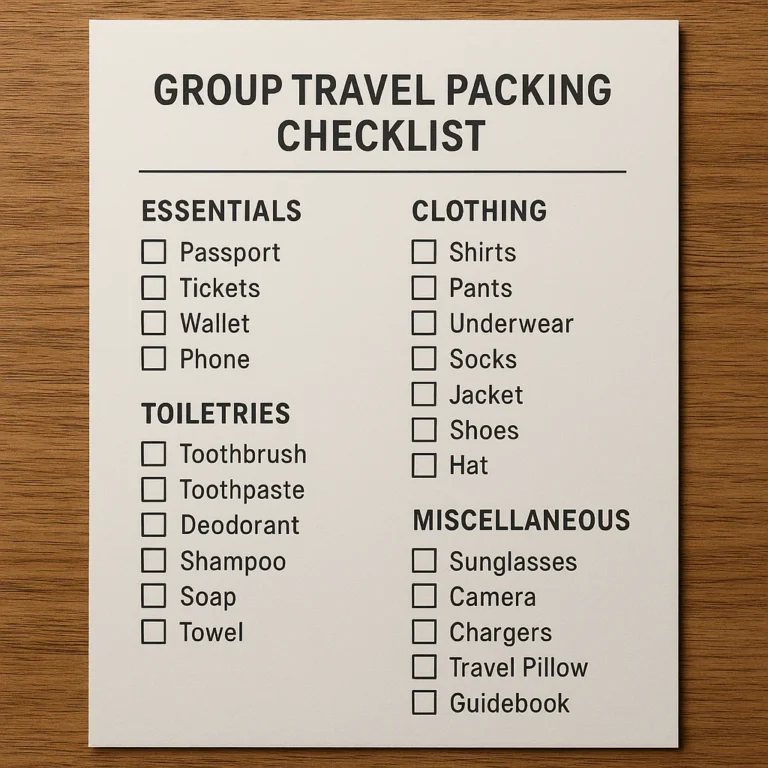
Think of this as a starter inventory, not a packing quota. Remove anything your family won’t use, and add what your destination, child, and travel style require.
| Checklist category | Examples to consider |
|---|---|
| Clothing | Everyday outfits, sleepwear, socks, underwear, layers, weather-appropriate outerwear |
| Toiletries | Toothbrushes, toothpaste, hairbrush, hygiene products, sunscreen |
| Health | Prescriptions, approved first-aid items, necessary medical equipment |
| Documents | Travel IDs, tickets, booking details, relevant permits or consent documents |
| Travel-day bag | Snacks, wipes, spare clothes, activities, comfort item, charger |
| Equipment | Stroller or carrier if needed, car seat where appropriate, child-specific gear |
| Home preparation | Laundry, pet care, lights, plants, rubbish, transport to departure point |
Cozi’s vacation packing checklist also suggests clothing, toiletries, medicines, essentials, documents, and entertainment. Its list is a broad prompt; tailor quantities and items to your family’s trip rather than treating the suggested inventory as mandatory.
Packing list for babies and toddlers
Depending on your child’s needs and the facilities available, consider:
- Nappies or diapers and wipes.
- Feeding supplies and familiar snacks.
- Spare clothing and sleepwear.
- Comfort items and a familiar bedtime aid.
- Stroller, carrier, or other mobility equipment if needed.
- Child-appropriate toiletries and any required health supplies.
Check airline, accommodation, and destination policies for equipment and items you plan to bring. Keep the supplies you may need during transit accessible rather than buried under everyone’s clothes.
Packing list for school-age children and teens
Ask each child to pack a small, agreed-upon selection of personal items:
- Clothing, sleepwear, and activity-appropriate shoes.
- Books, headphones, games, or other quiet entertainment.
- Chargers and personal devices, if permitted.
- A water bottle and travel-day snacks where appropriate.
- Any required personal care or health items.
Have an adult review essentials before the bag is closed. Kids are excellent at remembering a favorite graphic novel and less reliable at remembering the weather.
Family travel documents and booking details
Create a task to check that the family has the documents and confirmations required for its specific trip. Requirements may depend on nationality, destination, transit points, and the age or circumstances of each traveler.
Use official government sources for requirements. The U.S. Department of State’s international travel pages are a starting point for U.S. travelers; confirm details with relevant authorities and transport providers.
Road-trip checklist and car-seat essentials
Make separate tasks for vehicle readiness, route planning, stops, and the child’s travel setup. If you use a car seat, follow the manufacturer’s instructions and consult the NHTSA’s car-seat guidance for safety information. A checklist can prompt the check; it can’t confirm a seat is correctly installed.
For longer trips, list snacks, water, rubbish bags, entertainment, and planned breaks. Avoid putting all the entertainment in the trunk and then discovering the children are already asking for it.
Air travel checklist for kids
Before flying, check current airline and airport guidance for baggage, equipment, and child-related procedures. The TSA’s advice for traveling with children explains screening considerations in the United States.
Put high-use items in an accessible carry-on, and keep a spare outfit handy if that suits your family. The aim is not to bring everything onboard; it’s to avoid needing the one item packed at the bottom of the checked suitcase.
Beach, camping, and international trip add-ons
Use the trip type to decide which extras belong on your list:
- Beach: swimwear, sun protection, towels, and any child-specific water gear. Explore our Beach Vacation Checklists.
- Camping: weather layers, sleep equipment, lighting, and activity-specific gear. Start with Adventure Travel Checklists.
- Backpacking: compact essentials, carefully planned layers, and a realistic load. See Backpacking Checklists.
- Budget trip: meal and transport planning, a shopping list, and a check of what you already own. Browse Budget Travel Checklists.
- International trip: check passports, entry requirements, and destination advice through appropriate official sources.
🛠️ Set Up Your App Before the Trip
A few minutes of setup can save you from carrying one enormous, chaotic list from booking day to the baggage carousel.
Choose a family travel checklist app that fits your needs
Start with your family’s actual workflow:
- Do you need shared packing, or mainly a personal list?
- Are trip templates useful, or do you prefer to start from scratch?
- Do you need the list to work offline?
- Should the app include a family calendar, or is a focused packing app enough?
- What information would you need to store, and how does the app describe its data practices?
Cozi is a family organizer with shared lists and calendar features. PackMyTrip describes itself as a travel checklist app with trip templates and family-oriented suggestions. They serve related but different needs. Check current features, device compatibility, and plan details before deciding.
Create lists by child, bag, destination, and travel day
- Create one list for the trip. Use a clear name and destination.
- Add top-level categories. For example: documents, clothing, health, carry-on, and home.
- Separate bags where helpful. Keep carry-on tasks apart from checked luggage and car supplies.
- Add child-specific needs. Avoid repeating general items across multiple sections unless that helps your family.
- Make a final-day list. Include only what must be packed just before leaving.
- Review for clutter. Delete suggestions that do not apply so the important items are easy to spot.
Set reminders, due dates, and task owners
Assign a responsible person and, where useful, a due date. “Check passports” belongs earlier than “put the comfort toy in the carry-on,” which may need to happen just before departure.
If the app supports notifications, use them for tasks you might genuinely forget. Too many reminders are just another inbox with a suitcase.
Share lists with co-parents, relatives, or caregivers
Choose the sharing method that suits the group. PackMyTrip describes sharing trips through a code, while Cozi offers shared family lists and calendar tools. Confirm who can edit, whether updates sync, and what happens when a collaborator is removed.
Before sharing, keep personal details to a minimum. A packing list rarely needs a child’s full medical history.
Use templates without packing the entire house
Templates can catch overlooked categories, but they don’t know whether your hotel supplies towels or whether your child will wear the boots you packed. Treat every suggestion as a question:
- Will we use this?
- Is it available at the destination?
- Does it belong in a suitcase, carry-on, or car?
- Is it essential, or merely comforting to see it on a list?
PackMyTrip says its templates cover 15+ trip types and can tailor suggestions to trip details. That’s a useful launchpad, not a substitute for a destination-specific check.
👨 👩 👧 👦 Family-Friendly Planning by Age and Travel Style
Traveling with a baby
Use separate sections for feeding, changing, sleep, transport equipment, and health supplies. Keep a small travel-day set accessible, and confirm policies for any equipment you plan to bring.
A baby template can prompt useful categories, but your routine and professional medical advice should guide the actual list.
Traveling with toddlers and preschoolers
Keep the checklist concrete and visual where possible. “Pack blue backpack” is more actionable than “prepare toddler essentials.” Build in spare clothes, snacks, and a familiar comfort item, and let your child help with simple tasks.
Expect the list to change. Todlers have a remarkable talent for developing new requirements while you are already packing.
Traveling with school-age kids and teens
Give older children ownership over a few categories, then set a clear adult review point. Let them choose entertainment within practical limits and check their own bags for personal items.
A shared list can make responsibility visible without turning every packing decision into a family meeting.
Planning for solo parents and multigenerational trips
For a solo parent, assign tasks to helpers well ahead of departure and keep essential documents and arrangements easy to check. On a multigenerational trip, make sure the person managing the master list doesn’t assume every traveler has the same mobility, medical, food, or comfort needs.
Use a shared list for coordination, but share only the details each helper needs.
🔒 Privacy, Security, Offline Access, and Accessibility
Protect children’s personal and travel information
A checklist can include more personal data than you first intend. Avoid adding passport numbers, full medical histories, or detailed home-access information to a general list unless you have a clear reason and understand how the app handles it.
Apple’s App Store privacy labels provide developer-reported information about data practices. They are a useful starting point, not a guarantee that a particular app is suitable for every family’s privacy needs.
Check app permissions and data-sharing policies
Review the app’s privacy disclosures, permissions, and account-sharing setup. The Cozi App Store listing describes data categories that may be collected or linked to users; consult the current listing because disclosures can change.
For any app, ask:
- What data does the developer say it collects?
- Is the information linked to an account?
- Does the app describe tracking or third-party sharing?
- Can you remove a shared trip or delete your account?
Offline access, syncing, and battery considerations
If you expect to rely on a checklist while traveling, test it before departure:
- Open the trip while connected to the internet.
- Turn on airplane mode.
- Confirm you can view the checklist.
- Try a test edit if you need offline changes.
- Reconnect and check that updates sync as expected.
PackMyTrip says its lists work offline. Confirm the current app behavior on your device; offline viewing and offline editing are not necessarily the same thing.
Accessibility features for different family needs
Consider text size, contrast, screen-reader support, language options, and whether multiple people can comfortably use the list. PackMyTrip’s listing describes support for several languages and dark mode; check its App Store page for current compatibility and features.
If one family member cannot easily use the app, make sure the checklist can be shared in a format or workflow they can access.
⚖️ Benefits, Limitations, and Common Family Frustrations
| Potential benefit | Possible limitation |
|---|---|
| One shared place for packing and preparation tasks | Another app may mean another account or notification stream |
| Reusable lists for repeat trips | Old items can linger if a template is not reviewed |
| Clearer responsibility among caregivers | Not every app supports task assignment |
| Trip-specific suggestions | Suggestions may be irrelevant to your child or destination |
| Offline access in some apps | Offline edits and syncing need to be tested |
| Calendar and list coordination in family organizers | A general family app may have less travel-specific functionality |
What a checklist app can—and cannot—do
A checklist app can organize decisions and tasks. It cannot verify that a passport meets entry requirements, determine a child’s medical needs, guarantee an airline will accept particular equipment, or install a car seat correctly.
Use official and expert sources for those decisions, including government travel guidance, transport-provider policies, and the NHTSA’s car-seat information.
Avoiding duplicate tasks, notification overload, and outdated lists
- Keep one master trip list rather than copying tasks into several apps.
- Remove items that do not apply before sharing the list.
- Assign a task only once.
- Reserve reminders for deadlines or easily forgotten jobs.
- Review reusable lists after each trip and remove anything that caused clutter.
Some app reviews reveal a broader truth: a feature can be helpful overall while a particular redesign or workflow frustrates individual users. Cozi reviewers, for example, have praised family coordination while also criticizing aspects of its calendar experience. Read recent reviews for the feature you actually plan to use, not just the overall star score.
When a paper backup still makes sense
A paper list can be useful if a child wants to check off their own items, a caregiver does not use the app, or your phone battery is running low. Keep a compact backup of only the most important information rather than printing every packing suggestion.
💡 Quick Tips for Stress-Free Family Trip Planning
- Start early: separate tasks that need advance attention from packing-day jobs.
- Make the list fit the trip: destination, weather, transportation, and planned activities matter.
- Assign owners: name the person responsible for each task.
- Pack by bag: keep travel-day necessities accessible.
- Let kids help: give them age-appropriate choices and a short checklist of their own.
- Check official sources: verify travel-document, security, and safety requirements through relevant authorities.
- Test offline access: do it before you leave, not at the airport.
- Protect personal data: share the list without sharing more information than necessary.
- Keep a backup plan: a small paper list or secure copy can help if your phone is unavailable.
The most useful checklist is not the one with the most items. It’s the one that helps your family spot the important ones before the door closes behind you.