Support our educational content for free when you purchase through links on our site. Learn more
15 Best Road Trip Destinations & Planning Apps 🚗

The best road trip destinations with route planning checklist apps pair a route you’ll love with tools that keep the practical details under control: use Roadtrippers or Google My Maps to find and organize stops, Google Maps or Waze for navigation, and a checklist for bookings, packing, and vehicle prep.
We learned the value of that mix the hard way: one “quick” detour can turn a tidy driving day into a sunset arrival. Now we sort stops into must-see and nice-if-there’s-time, download maps before leaving coverage, and check official sources for park access, permits, and road conditions.
From Utah’s red-rock parks and California’s redwood coast to Canada’s Icefields Parkway, this guide matches memorable drives with practical planning tools. The goal isn’t to cram more pins onto your map. It’s to arrive with enough time and energy to enjoy the places you came to see.
Key Takeaways
- Choose a destination that suits your pace and check current road conditions, weather, access, and reservation requirements before setting out.
- Use the right app for each job: Roadtrippers for discovering stops, Google My Maps for organizing pins, and Google Maps or Waze for navigation.
- Download offline maps and save key details before driving through areas with unreliable cell service.
- Build a flexible itinerary with realistic driving days, planned breaks, fuel stops, overnight options, and optional detours.
- Treat app listings and user reviews as helpful clues, not guarantees. Verify important information with official park, road, and reservation sources.
- Keep safety and privacy in the plan: set navigation before moving, review app permissions, and pull over before changing routes.
Table of Contents
- ⚡️ Quick Tips and Facts
- 🧭 Road Trip Route Planning: What to Know Before You Go
- How route-planning apps turn a good drive into a great one
- What makes a road trip destination worth the detour?
- 📱 Best Road Trip Planning Apps at a Glance
- Navigation, itinerary planning, and road-trip discovery compared
- Which app is best for your travel style?
- 🚗 Best Road Trip Destinations and Scenic Routes
- 1. The United States and Canada: Iconic highways and big-sky scenery
- 2. Europe: Coastal drives, mountain passes, and historic towns
- 3. Asia Pacific: Island roads and dramatic landscapes
- 4. Latin America and the Caribbean: Rainforest routes and coastal escapes
- 5. Africa, the Middle East, and India: Epic drives and practical planning
- 🗺️ How to Choose the Right Road Trip Route Planner
- Offline maps, live traffic, and reliable GPS navigation
- Multi-stop itineraries, fuel stops, and points of interest
- Road conditions, weather alerts, and vehicle restrictions
- Free versus paid features: What’s worth using?
- ✅ The Complete Road Trip Route-Planning Checklist
- Before you leave: Build and save your itinerary
- Pack digital and paper backups
- Check your vehicle, documents, and roadside essentials
- Plan for fuel, food, rest breaks, and overnight stops
- On the road: Keep your route flexible and safe
- 🔒 App Privacy, Permissions, and Location Data
- What location information can navigation apps collect?
- Privacy settings to check before your trip
- ♿ Accessibility and Easy-to-Use Road Trip Apps
- Voice guidance, screen readers, and readable maps
- Planning accessible stops and facilities
- ⭐ App Ratings, Reviews, and Real-World Road-Test Tips
- What to look for in user reviews
- Common app frustrations and simple workarounds
- 🆕 App Updates and Features to Check Before a Trip
- 🎒 Your First Trip with a Road Trip Planning App
- Create a sample route and test it at home
- Combine discovery apps with turn-by-turn navigation
- 💡 Quick Tips for a Smother Scenic Drive
- 🏁 Conclusion
- 🔗 Recommended Links
- ❓ FAQ
- What is the best app for planning a road trip route?
- Which road trip apps work offline?
- Can I plan a road trip with multiple stops?
- Are road trip planning apps free?
- How do I find scenic stops along my route?
- Should I use more than one navigation app?
- How can I protect my location privacy while traveling?
- 📚 Reference Links
⚡️ Quick Tips and Facts
Planning a memorable drive starts with choosing the right destination, then matching your route, stops, and backup plans to the kind of trip you actually want. Our guide top travel destinations is a handy place to start gathering ideas.
At Travel Checklist™, we’ve learned that a road-trip app is best treated as a co-pilot, not the whole crew. One app may find a memorable roadside diner; another may better at live traffic; a simple shared checklist can keep everyone from forgetting the charging cable. 🧭
| Road-trip need | Useful app or tool | Best for | One thing to check |
|---|---|---|---|
| Turn-by-turn navigation | Google Maps | Directions, traffic, and finding services | Download offline maps before coverage disappears |
| Live driving reports | Waze | Community-reported traffic and road alerts | Keep your eyes on the road; don’t adjust the app while driving |
| Scenic stops and itinerary discovery | Roadtrippers | Attractions, campgrounds, and detours | Check current plan limits and features |
| Shared itinerary and trip organization | Wanderlog | Collaborative planning and trip details | Confirm offline access for your planned use |
| Custom map pins and route research | Google My Maps | Saving places, notes, and map layers | My Maps is for planning; use a navigation app for live driving |
| Hikes and trail research | AllTrails | Trail discovery and hike planning | Check local conditions and download relevant maps |
| Public-land campsites and permits | Recreation.gov | Federal recreation bookings and reservations | Confirm permit, entry, and reservation requirements for each site |
Quick tips before you set off:
- ✅ Plan the route, then leave breathing room. A map can show drive time; it cannot predict how long you’ll linger at a waterfall.
- ✅ Download offline maps and save important addresses before leaving reliable cell service.
- ✅ Use one app to discover stops and another to navigate if that combination works better for you. The comparison in More Than Just Parks’ road-trip tools guide also recommends pairing Google Maps and My Maps with Roadtrippers for place discovery.
- ✅ Check current road, weather, and park information with official sources. For U.S. federal recreation sites, start with Recreation.gov; for national parks, check the relevant National Park Service park page.
- ❌ Don’t assume one app has the final word on closures, campground availability, road restrictions, or permits.
- ✅ Put safety-critical plans somewhere you can access offline, and pull over before changing your route.
How to choose a road trip destination that fits your crew
Ask three simple questions: How much driving do you want? What do you want to see? How much planning do reservations require? The right answer for a family with young kids may be a string of short scenic drives and predictable stops. A camping-focused trip might need more advance work on permits, fuel, and access roads.
If the trip leans toward hiking and wilderness, browse our Adventure Travel Checklists and Backpacking Checklists. For a coastal escape, the Beach Vacation Checklists can help you remember the less glamorous essentials, such as sun protection and a towel that dries before the next stop.
🧭 Road Trip Route Planning: What to Know Before You Go
A road trip is part transportation, part itinerary, and part willingness to pull over because a sign says “world’s largest…” and curiosity wins. Good route planning makes space for all three.
How route-planning apps turn a good drive into a great one
Most road-trip planning tools fall into four useful jobs:
- Navigation: Turn-by-turn directions, traffic, and rerouting.
- Discovery: Attractions, scenic stops, campgrounds, and places to eat.
- Organization: Daily plans, bookings, notes, and shared checklists.
- Preparation: Offline maps, permits, vehicle checks, and backup information.
One app may cover several jobs, but no single tool is automatically best at all of them. Google Maps is useful for everyday route research and navigation. Roadtrippers is designed to help travelers discover places along a journey. Wanderlog can help organize an itinerary with other travelers. A paper map or saved document can still be useful when a phone is out of battery or signal.
In the video linked as #featured-video, the presenter recommends matching travel apps to the job: Waze for driving updates, Maps.me for offline navigation, Google Translate for language help, and cloud storage for backups. That’s a sensible principle for road trips, too: pick tools by task, then test them before departure.
What makes a road trip destination worth the detour?
A worthwhile destination is more than a pretty pin on a map. We weigh:
- Route quality: Is the drive itself scenic, or is the highlight only at the end?
- Time required: Can you enjoy the stop without turning the day into a race?
- Access: Are roads suitable for your vehicle, season, and driving experience?
- Practicalities: Are there fuel, food, restrooms, and overnight options nearby?
- Reservation needs: Do you need timed entry, a campground booking, or a permit?
- Backup options: If weather changes, is there another activity or route?
For national park trips, check official park information before relying on an app listing. Road access, seasonal closures, timed entry, and services can change. The National Park Service is the authoritative starting point for U.S. national parks.
📱 Best Road Trip Planning Apps at a Glance
The best road trip app depends on what you need it to do. Here’s a practical comparison of well-known tools; features, supported regions, and plan limits can change, so check each provider’s current details before building a trip around a specific feature.
| App or tool | Strongest use | Notable benefits | Potential drawback |
|---|---|---|---|
| Google Maps | Navigation and local search | Familiar directions, traffic information, and place search | Not designed as a full vacation checklist or booking organizer |
| Google My Maps | Custom trip maps | Save and organize pins, notes, and layers | Planning map, not a substitute for live turn-by-turn navigation |
| Waze | Live driving reports | Community-reported conditions and route updates | Can prioritize changing traffic routes over sightseeing |
| Roadtrippers | Finding detours and attractions | Road-trip discovery, route planning, and trip collaboration | Stop limits and features depend on its current plan |
| Wanderlog | Shared itinerary planning | Organizes trip details and collaborative plans | Check which functions require an account or paid tier |
| AllTrails | Trail research | Trail discovery, reviews, and route information | Trail listings are not a substitute for local safety advice |
| GasBuddy | Fuel planning | Helps locate fuel information and plan fuel stops | Reported fuel information may not always be current |
| Recreation.gov | U.S. federal recreation reservations | Official reservation and permit services for supported sites | Availability and rules vary by destination |
Navigation, itinerary planning, and road-trip discovery compared
Road-trip app comparisons can appear to disagree because they often use different definitions of “best.” A navigation app might win for traffic updates; an itinerary tool might win for shared planning; a discovery app might win for unusual stops. That is why we don’t treat a top-pick badge as proof that an app can do everything.
More Than Just Parks’ guide to road-trip planning tools recommends a combined setup: Google Maps and My Maps for route research, Roadtrippers for finding stops, and Recreation.gov for eligible U.S. recreation reservations. Its authors describe using the tools across extensive road-trip experience. That perspective is useful, but features and free-plan limits can change, so verify current terms directly with the app or service.
Roadtrippers describes its Autopilot™ trip-planning feature as drawing on insights from millions of trips. Its Apple listing has also described attraction discovery, planning, and features for RV travelers. Treat those as product claims, not a guarantee that every recommendation fits your interests or current road conditions. Review the suggested itinerary, check official information, and adjust it yourself.
Which app is best for your travel style?
| Your travel style | A practical starting combination |
|---|---|
| First road trip | Google Maps + a simple shared checklist |
| National park loop | Google Maps or My Maps + Roadtrippers + Recreation.gov |
| RV or camping trip | Roadtrippers + campground research + official road and land information |
| Hike-heavy route | Maps app + AllTrails + weather and park-service checks |
| Group trip with shared decisions | Wanderlog or a shared document + a navigation app |
| International drive | Local navigation coverage check + offline maps + translation tool |
Our recommendation: Start with two or three tools, not eight. A small, tested setup is easier to maintain than a digital glove box full of apps you haven’t opened since downloading them.
🚗 Best Road Trip Destinations and Scenic Routes
These destinations are starting points for route planning, not promises that every road will be open or every stop will fit into one trip. Check official road, weather, park, border, and reservation information for your dates.
| Region | Road-trip idea | Good fit for | Planning reminder |
|---|---|---|---|
| United States | Utah’s national parks | Desert scenery, geology, and park visits | Check park reservations, heat, water needs, and driving distances |
| United States | Redwood country, California | Forests, coastal scenery, and short nature stops | Confirm road conditions and campground availability |
| United States | Death Valley, California and Nevada | Desert landscapes and striking viewpoints | Review extreme-weather guidance, fuel planning, and seasonal access |
| United States | Theodore Roosevelt National Park, North Dakota | Badlands scenery and quieter prairie landscapes | Check current park roads, services, and seasonal conditions |
| Canada | Icefields Parkway, Alberta | Mountain scenery and glacier-country stops | Check road conditions, weather, and services before driving |
| Europe | Atlantic coastal routes and alpine drives | Coastal villages, mountain scenery, and historic stops | Check tolls, local driving rules, and seasonal mountain access |
| Asia Pacific | New Zealand’s scenic highways | Coastal and mountain landscapes | Allow generous drive times and check local road conditions |
| Latin America and the Caribbean | Costa Rica’s rainforest and Pacific routes | Wildlife, beaches, and varied terrain | Verify road conditions, weather, and travel-time estimates |
| Africa, the Middle East, and India | South Africa’s Garden Route | Coastal scenery, towns, and nature stops | Research current local guidance, distances, and accommodation |
For U.S. national-park planning, official park pages from the National Park Service are more reliable than an old itinerary screenshot. For Canada, check Parks Canada. For weather and road conditions, use the relevant government agencies and local authorities for your destination.
1. The United States and Canada: Iconic highways and big-sky scenery
Utah’s national parks
Utah’s national parks make a memorable road-trip loop for travelers who enjoy red-rock landscapes and short scenic stops. The famous parks are spread across a large region, so plan realistic drive days rather than trying to “collect” them all at highway speed. Use official National Park Service park pages to check current access, services, alerts, and reservation guidance.
Planning checklist:
- Save park entrances, lodging, and fuel stops separately.
- Check whether any timed-entry or reservation rules apply to your dates.
- Carry enough water and plan for changing desert conditions.
- Build a backup plan for heat, storms, or crowded trailheads.
Redwood National and State Parks
Redwood country rewards slower travel: forest roads, coastal stops, and short walks can easily fill a day. Check the National Park Service’s Redwood information and state-park information before setting your route. A navigation app may show a road as passable without telling you whether it suits your vehicle or current conditions.
Death Valley National Park
Death Valley is spectacular, but its scale and desert climate call for serious preparation. Start with the official Death Valley safety and planning information. Fuel, water, vehicle readiness, weather, and road status matter more here than finding one extra photo stop.
Theodore Roosevelt National Park
North Dakota’s badlands offer a quieter, wide-open road-trip experience. Check the official park site for current park conditions and practical visitor information. It’s a good reminder that a destination does not need a famous skyline to make a satisfying drive.
Canada’s Icefields Parkway
The Icefields Parkway is known for mountain scenery between Jasper and Banff. Before setting out, check Parks Canada’s Icefields Parkway information and relevant road updates. Mountain weather and services can change quickly, so save key stops offline and don’t plan the drive around a tight arrival deadline.
2. Europe: Coastal drives, mountain passes, and historic towns
European road trips can combine scenic roads with compact historic towns, but border rules, tolls, parking restrictions, and local driving laws vary by country.
Before you go:
- Check your driving licence and rental-car requirements.
- Confirm whether toll roads, low-emission zones, or city restrictions affect your route.
- Research seasonal closures for mountain passes.
- Use official tourism and road-authority information for current conditions.
- Save accommodation addresses in the local spelling as well as your preferred language.
For regional inspiration, use a reliable destination source such as Visit Europe and confirm road details with the relevant national authority.
3. Asia Pacific: Island roads and dramatic landscapes
From New Zealand’s winding scenic roads to regional drives in Australia and Japan, Asia Pacific offers varied landscapes and driving conditions. Do not copy a map estimate blindly: road type, weather, ferry schedules, left-side driving, and remote fuel availability can all affect your day.
For New Zealand, consult official New Zealand tourism information and local road-condition updates. For any destination, download maps in advance, check rental-car rules, and make sure your plan includes realistic breaks.
4. Latin America and the Caribbean: Rainforest routes and coastal escapes
A drive in Costa Rica, Mexico, or the Caribbean may involve changing road surfaces, mountain routes, weather, or limited services between destinations. Use current local guidance, check insurance and rental terms, and avoid treating a short map distance as a short drive.
If your itinerary includes beach time, our Beach Vacation Checklists can help with practical packing. For longer, more adventurous routes, see Adventure Travel Checklists.
5. Africa, the Middle East, and India: Epic drives and practical planning
Long-distance drives in these regions can be rewarding, but planning needs to be destination-specific. Research local driving rules, fuel availability, road conditions, permits, border requirements, and current travel guidance before committing to a route.
For South Africa’s Garden Route, use established tourism sources such as South African Tourism alongside local road and weather updates. For remote drives anywhere, share your itinerary with someone at home and identify backup accommodation and fuel options.
🗺️ How to Choose the Right Road Trip Route Planner
A route-planning app should match your trip’s reality: your destinations, device, connectivity, vehicle, and appetite for spreadsheets. Before committing, test the exact features you expect to use.
Offline maps, live traffic, and reliable GPS navigation
Offline maps are essential when you may lose coverage. Google Maps provides instructions for downloading areas for offline use; check what remains available offline, because live traffic and some other features depend on an internet connection.
The first video linked at #featured-video also highlights Maps.me for offline navigation and Waze for live driving updates. These tools solve different problems: offline maps can help when the signal vanishes; live-reporting apps can help when connectivity is available. Neither replaces road signs, local instructions, or careful driving.
Before departure:
- Download the map area for your whole route, including likely detours.
- Search for a known destination while offline to confirm the map is stored.
- Save addresses and parking locations in a notes app or checklist.
- Bring a car charger and a backup charging cable.
- Keep a paper map for remote or complicated routes if practical.
Multi-stop itineraries, fuel stops, and points of interest
A useful road-trip planner lets you organize stops into sensible days. Roadtrippers focuses on discovery and road-trip planning; Google My Maps lets you build a custom map; Wanderlog can help organize shared trip details.
When reviewing a route planner, check:
- How many stops you can add under the current plan.
- Whether stops can be reordered easily.
- Whether other travelers can edit the itinerary.
- If notes, reservations, or links can be attached to stops.
- Whether it provides useful driving-time estimates.
- How the route changes when you add a detour.
- Whether saved information works offline.
For fuel planning, GasBuddy can help travelers look for fuel information, but reported prices and availability may change. Use it to plan, then verify locally.
Road conditions, weather alerts, and vehicle restrictions
Navigation apps are not the final authority for closures, road hazards, permits, or vehicle restrictions. Check official sources for the region you’re traveling through.
- United States parks: National Park Service alerts
- U.S. federal recreation reservations: Recreation.gov
- Canadian national parks: Parks Canada
- Weather: National Weather Service in the U.S., or the relevant national weather service elsewhere
For RVs, camper vans, or vehicles towing a trailer, confirm road width, height limits, grades, and access restrictions. An RV-friendly setting can help, but it cannot inspect the road for you.
Free versus paid features: What’s worth using?
Many apps are free to download and offer optional paid features. Limits may apply to trip stops, offline maps, collaboration, or advanced planning. Because plans change, check the official product page rather than relying on an older comparison.
| Pay for a feature only if… | A free option may be enough if… |
|---|---|
| You need a large number of stops or extensive trip collaboration | Your route has a handful of straightforward destinations |
| You’ll use offline navigation regularly | Your route stays in reliable coverage and you’ve saved backups |
| You want specialized RV or camping-planning tools | You’re driving a standard vehicle and booking separately |
| You’ll use premium trip features throughout the year | You only need help with one short trip |
Our rule: Test the free version on a small sample itinerary first. Upgrade only when you hit a genuine limitation, not because a feature list looks impressive.
✅ The Complete Road Trip Route-Planning Checklist
A good checklist is not a command to plan every minute. It is a way to make sure the unglamorous details are handled before they become roadside surprises. 📝
Before you leave: Build and save your itinerary
Step 1: Choose a trip shape
Pick a loop, point-to-point route, or base-camp trip. A loop reduces backtracking; a point-to-point route can cover more ground but may require different vehicle drop-off arrangements.
Step 2: Set a realistic daily driving limit
Use app estimates as a starting point, then account for breaks, meals, traffic, weather, fuel, and sightseeing. A drive-time estimate is not the same thing as a comfortable travel day.
Step 3: Add must-see stops first
Save the attractions, parks, lodging, and essential services that matter most. Then add optional detours. If every pin is a “must,” you’ve planned a scavenger hunt with a steering wheel.
Step 4: Verify reservations and permits
Check confirmation details, arrival windows, cancellation policies, permit rules, and address accuracy. Use official booking channels where applicable, such as Recreation.gov for supported U.S. federal recreation facilities.
Step 5: Share the plan
Send your itinerary and an emergency contact plan to someone you trust. Keep important reservation details accessible to at least one other traveler.
Step 6: Save an offline backup
Download maps, save key addresses, and store confirmations in an accessible place. A printed itinerary or saved PDF can help if your device fails.
Pack digital and paper backups
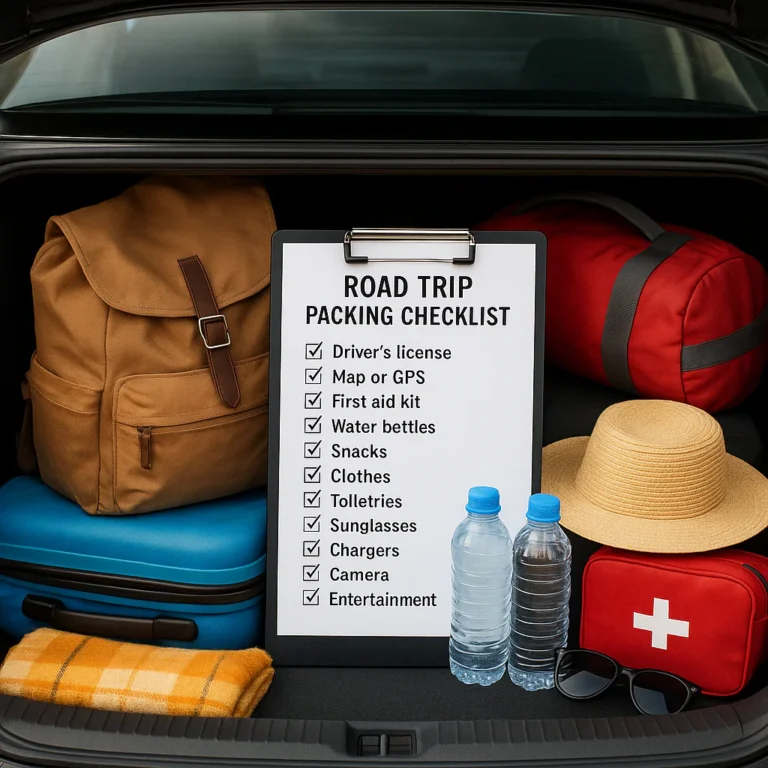
- Offline map of the route and destination areas
- Digital and printed reservation confirmations
- Driver’s licence, vehicle documents, and insurance information
- Charging cable and car adapter
- Power bank
- Emergency contacts saved offline
- Paper map for remote routes, if useful
- A shared itinerary in Google Docs or another accessible document
The video’s recommendation to back up photos and videos with Google Drive or Dropbox is useful beyond photos: back up critical trip information, too, while avoiding unnecessary storage of sensitive personal details.
Check your vehicle, documents, and roadside essentials
Before departure, review your owner’s manual and vehicle-specific maintenance needs. The National Highway Traffic Safety Administration provides U.S. vehicle-safety information.
Vehicle checklist:
- Tires, including the spare if equipped
- Brakes, lights, and windshield wipers
- Fluids and scheduled maintenance
- Registration and proof of insurance
- Roadside assistance details
- First-aid supplies
- Flashlight and reflective safety equipment
- Phone mount positioned safely and legally
- Water and weather-appropriate supplies
Do not treat an app’s estimated fuel range as a guarantee. Remote stretches, elevation, weather, cargo, and vehicle condition can affect range.
Plan for fuel, food, rest breaks, and overnight stops
- Identify fuel stops before remote stretches.
- Save rest areas, grocery stores, and reliable places to eat.
- Check operating hours; an app listing may be outdated.
- Book overnight accommodation where availability is limited.
- Choose a backup stop in case your planned one is closed or full.
- Schedule breaks before fatigue makes the decision for you.
For campgrounds and public lands, review official rules and booking requirements. For non-campground stays, compare listings and policies through providers such as Booking.com or Airbnb, then confirm the address and check-in details directly.
On the road: Keep your route flexible and safe
- Set navigation before moving.
- Let a passenger handle route changes when one is available.
- Pull over safely before searching, messaging, or changing destinations.
- Check road and weather updates at planned stops.
- Revisit the itinerary each morning, not every five minutes.
- Drop optional stops if conditions, fatigue, or timing call for it.
The best detour is the one you can enjoy without making the rest of the drive miserable. And that takes us to an easily overlooked part of app planning: the information your tools collect along the way.
🔒 App Privacy, Permissions, and Location Data
Navigation tools may need location access to provide directions, but you can still make informed choices about permissions, background access, and stored trip details.
What location information can navigation apps collect?
The exact data depends on the app, device settings, account, and how you use it. An app’s privacy disclosure may distinguish between data linked to your identity and data not linked to you. Those labels do not mean an app collects nothing.
For Apple devices, review the app’s privacy information on its App Store listing and check Apple’s Location Services settings guidance. On Android, review app permissions through Google’s Android privacy and permissions guidance.
Privacy settings to check before your trip
- Allow location access only as needed.
- Review background location permissions.
- Check whether location history or activity tracking is enabled.
- Avoid posting live location or overnight accommodation publicly.
- Keep account recovery information up to date.
- Read the privacy policy before enabling optional personalization or sharing.
One practical trade-off: restricting background location can reduce ongoing tracking and battery use, but some app functions may work differently. Test your preferred settings before departure.
♿ Accessibility and Easy-to-Use Road Trip Apps
An accessible itinerary considers more than the route line. You may need step-free lodging, accessible restrooms, lower walking distances, frequent breaks, or clear audio guidance.
Voice guidance, screen readers, and readable maps
Before choosing an app, test:
- Voice navigation and voice volume.
- Screen-reader compatibility.
- Text size, contrast, and map labels.
- Whether directions are clear at complex junctions.
- How easy it is to use hands-free controls.
- Whether a passenger can manage the app without interrupting the driver.
Apple provides accessibility guidance for iPhone; Android users can consult Android Accessibility Help. Features vary by device and app version.
Planning accessible stops and facilities
Check facility details with the attraction, park, hotel, or service provider directly. Listings can be incomplete or out of date, and “accessible” may not describe the exact features you need.
Add notes to your trip plan for:
- Accessible parking and entrances
- Restroom details
- Surface type and distance from parking
- Elevator or step-free access
- Service-animal policies
- Contact details for confirming accommodations
A passenger’s perspective matters here: the easiest route for the driver may not be the easiest route for everyone in the car. Ask what makes each day comfortable before locking the schedule.
⭐ App Ratings, Reviews, and Real-World Road-Test Tips
User reviews are helpful for identifying recurring frustrations, but an individual review is not a controlled test. Look for repeated, recent reports and compare them with official feature information.
What to look for in user reviews
When checking reviews for Roadtrippers, Wanderlog, or another planner, scan for:
- Recent comments about crashes or syncing.
- Feedback on stop limits and itinerary editing.
- Reports about offline reliability.
- Accessibility and battery-use concerns.
- Developer responses to recurring complaints.
- Whether the reviewer’s trip type matches yours.
Some Roadtrippers App Store reviewers have praised its intuitive stop planning, easy itinerary changes, and fuel estimates that came close to their own tracking. Others have requested clearer trip-duration details, more flexible date management, improved organization of past and future trips, and better export options. These are individual user experiences, not proof that the same issue affects every traveler or version.
Common app frustrations and simple workarounds
| Frustration | Practical workaround |
|---|---|
| A route line covers road numbers or labels | Zoom in, switch map views, or cross-check with a second map |
| A PDF itinerary is hard to read | Keep a concise daily document or export a simplified version |
| A custom stop has an unclear label | Add a note with the business name and full address |
| The app’s fuel estimate differs from actual use | Treat the figure as an estimate; track fuel separately if precision matters |
| Trip dates or days are confusing | Label each day with a date and destination in a shared note |
| Data disappears or fails to sync | Save critical details offline and keep confirmations separately |
How to road-test an app before departure
- Make a sample trip with several stops.
- Invite a travel companion to view or edit it.
- Try exporting or sharing the itinerary.
- Download a test map area.
- Open the map with mobile data turned off.
- Check battery use and location permissions.
- Confirm that your key route and addresses are available without hunting through menus.
🆕 App Updates and Features to Check Before a Trip
App features change; so do subscription terms, stop limits, privacy controls, and compatibility requirements. Before departure, check the current version and the app’s official feature page.
For Roadtrippers, verify the current membership options, maximum stops, offline-map availability, collaboration features, and supported navigation integrations. For Google Maps, confirm offline-map behavior and coverage for your route. For any app, check that your phone’s operating system is compatible and that automatic updates haven’t changed settings unexpectedly.
Trip-week checklist:
- Update apps while connected to reliable Wi-Fi.
- Reopen the itinerary after updating.
- Confirm downloaded maps are still available.
- Recheck saved places and shared access.
- Charge devices and test the car connection.
- Keep at least one route backup outside the app.
🎒 Your First Trip with a Road Trip Planning App
The easiest way to learn a trip planner is to build a small route before you build the big one. We once added enough “quick” stops to a day that the plan looked less like a scenic drive and more like a relay race. The fix was simple: separate essential stops from optional ones, then leave room to change our minds.
Create a sample route and test it at home
- Choose a short practice route with a few stops you already know.
- Add a meal break, fuel stop, and one optional attraction.
- Reorder stops to see how the route changes.
- Share the trip with a companion and test editing permissions.
- Save the route offline if the app supports it.
- Review the trip on a second device or in a browser.
- Write down anything the app does poorly and create a backup method.
This quick rehearsal reveals whether the interface suits your group before you’re trying to find a campground after dark.
Combine discovery apps with turn-by-turn navigation
A discovery tool helps answer “What’s worth stopping for?” A navigation app helps answer “How do we get there now?” Those are related questions, but not always the same task.
A practical combination could look like this:
- Use Roadtrippers to find possible attractions and campgrounds.
- Use Google My Maps to group saved places geographically.
- Use Google Maps or Waze for driving directions.
- Use Recreation.gov for eligible U.S. federal recreation bookings.
- Keep the final daily itinerary in a shared checklist or document.
For a broader trip-preparation system, our Budget Travel Checklists and Digital Nomad Checklists can help if your drive also involves cost tracking or working on the road.